
Custom AI Copilots for IT Teams: RAG-Grounded Support & DevOps
A support copilot only earns trust when every answer traces back to a real source. UAE IT teams that ground their copilot in actual product docs and resolved tickets, instead of a generic model's guess, routinely automate 60-70% of inbound ticket volume without a support headcount increase. This guide covers what makes that grounding work, which tickets to automate first, how to design the human handoff, and what to measure once it's live.
 By: Asad Siddiq
Support queues in fast-growing UAE tech teams fill up with the same handful of questions, asked a hundred different ways. A generic chatbot answers confidently and wrong just as often as it answers right, because it has no grounding in your actual systems. That gap is exactly what an AI copilots and assistants build targets, and it's the fastest-ROI use case we see across IT and tech engagements in the region.
What Makes a Support Copilot Trustworthy Instead of a Liability?
Grounding. A retrieval-augmented copilot answers from your real documentation and past resolved tickets, not from what the base model was trained on months ago. Every response can point back to the exact source passage it used. The same discipline behind our RAG & Knowledge Systems work. Without that traceability, you're shipping a confident guesser, not a support tool.
Retrieval-Augmented Generation vs. a Bare Fine-Tuned Model
A fine-tuned model bakes knowledge into its weights at a fixed point in time; every product update, policy change, or new known issue means retraining. A RAG-grounded copilot instead retrieves the current version of a doc or ticket at answer time, so it stays accurate as your knowledge base changes without a retraining cycle. For IT teams shipping product updates weekly, that difference alone decides whether the copilot is trustworthy six months in or has quietly drifted stale.
What 'Traceability' Actually Looks Like in Practice
Every answer the copilot gives should carry a visible source link back to the doc page or past ticket it drew from. That's not a nice-to-have UI detail, it's what lets a support lead spot-check accuracy without re-answering every question themselves, and it's what lets an agent quickly verify a copilot's answer before passing it to a customer on an edge case.
Which Tickets Should Actually Get Automated?
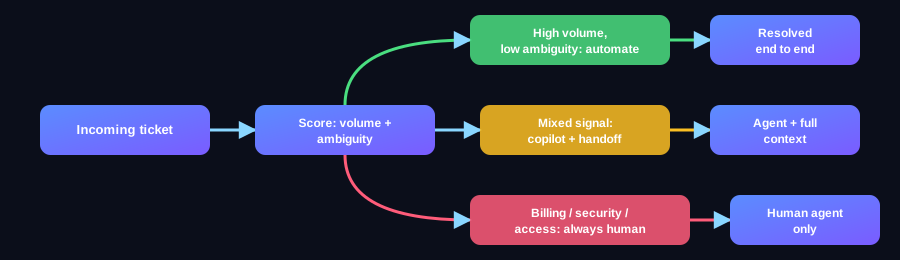
Not every ticket category is a safe automation target. The right starting set is narrow, high-volume, and low-ambiguity. Expanding scope only after the first category proves out.
- Repeat how-to questions already answered in your docs; highest volume, safest to automate first.
- Known-fix issues with a documented resolution path, automate the fix, not just the answer.
- Status and account lookups against your own systems. Structured data, low ambiguity.
- Anything touching billing disputes, security incidents, or account access; route to a human, always.
A Simple Framework for Ranking Ticket Categories
Score each ticket category on two axes: volume (how often it comes in) and ambiguity (how much judgment a resolution requires). High-volume, low-ambiguity categories go first. Low-volume or high-ambiguity categories stay human, regardless of how automatable they look on paper, the cost of a wrong automated answer on a high-stakes ticket outweighs the time saved.
How Do You Handle What the Model Doesn't Know?
Confidence scoring on every response. When the copilot's retrieval confidence drops below a set threshold, it hands off to a human agent with the full conversation and retrieved context attached, not a cold transfer. That handoff design is what separates a copilot that protects your support quality from one that quietly erodes it.
Setting the Confidence Threshold
Too low a threshold and the copilot answers when it shouldn't, eroding trust one wrong answer at a time. Too high and it hands off questions it could have safely resolved, defeating the point. Start conservative, hand off more than feels necessary in the first weeks, and loosen the threshold only once you've validated accuracy on the categories you've automated. It's much easier to earn back automation scope than to earn back a customer's trust after a wrong answer.
Designing the Escalation Path
A cold handoff, where a human agent gets a bare ticket with no context, often takes longer to resolve than if the copilot had never touched it. The escalation should carry the full conversation, the retrieved sources the copilot considered, and its confidence score, so the human agent picks up exactly where the copilot left off instead of starting over.

The goal isn't zero human tickets. It's a human agent who never has to answer the same question twice.
What Does a UAE IT Team Need Before Starting?
Clean, current documentation is the real prerequisite, not a bigger model. If your docs are stale or scattered across three tools, that gets fixed first, because a copilot grounded in wrong information is worse than no copilot.
Auditing Your Documentation Before You Start
Walk your top 20 recurring ticket categories against your current docs. Any category where the answer is missing, outdated, or split across multiple conflicting sources needs a documentation fix before it's a safe automation candidate. This audit alone usually surfaces gaps worth fixing regardless of whether you build a copilot.

A Realistic Rollout Timeline
Most UAE IT teams move through three phases: a 2-3 week documentation audit and cleanup, a pilot on 1-2 ticket categories running alongside human agents for validation, then a phased expansion into additional categories as accuracy holds. Teams that skip the pilot phase and go straight to full deployment are the ones most likely to walk the automation back after a bad first week.
What Mistakes Sink Most Copilot Rollouts?
The pattern repeats across almost every failed rollout we've reviewed: teams optimize for launch speed over grounding quality, then wonder why trust collapses in week three.
Mistake 1: Launching Before the Documentation Audit
Teams eager to show progress skip straight to building the copilot and grounding it in whatever docs already exist, gaps and all. The copilot then answers confidently from outdated or missing information, and the first bad answer a customer catches undoes weeks of goodwill. The audit isn't a delay. It's what makes the launch worth doing.
Mistake 2: Treating the Confidence Threshold as a One-Time Setting
A threshold tuned for launch week doesn't stay right forever. As your product changes and new ticket categories appear, the threshold needs periodic review; teams that set it once and never revisit it either drift toward too many wrong answers or too many unnecessary handoffs, and rarely notice until a support lead audits a sample manually.
Mistake 3: No Owner for Documentation Freshness
A copilot is only as current as its source docs. Without a clear owner responsible for keeping documentation updated as the product changes, the grounding quality degrades silently, the copilot doesn't get worse overnight, it drifts, which makes the problem harder to catch until accuracy has already slipped noticeably.
How Do You Measure Whether It's Actually Working?
Ticket deflection rate alone is a misleading metric. A copilot that deflects a lot of tickets with wrong answers looks good on a dashboard and bad in customer satisfaction scores a month later.
The Metrics That Actually Matter
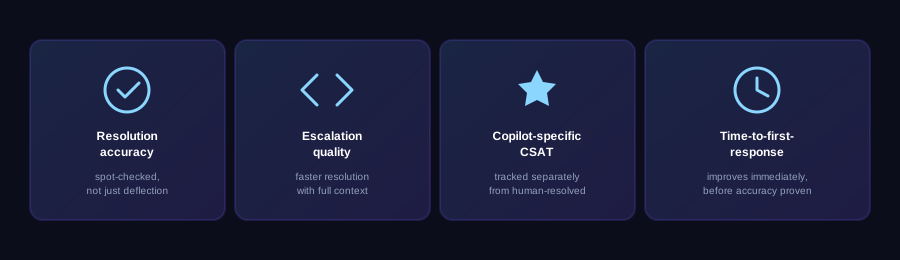
- Resolution accuracy on automated tickets, validated by periodic human spot-checks, not just deflection count.
- Escalation quality: do handed-off tickets resolve faster than before, given the context attached?
- Customer satisfaction on copilot-resolved tickets specifically, tracked separately from human-resolved ones.
- Time-to-first-response, which usually improves immediately even before resolution accuracy is fully validated.
Book a consultation to scope which ticket categories are worth automating first, based on your actual volume and documentation readiness, not a generic platform pitch.
What Does a Typical Rollout Look Like End to End?
Walking through a representative timeline makes the abstract phases above concrete.
Weeks 1-3: Documentation Audit and Ticket Category Analysis
The team pulls the last 3-6 months of ticket data, categorizes it by type and volume, and cross-references each high-volume category against current documentation. Gaps get flagged and either fixed or excluded from the initial automation scope. This phase usually surfaces more documentation debt than expected, that's normal, not a setback.
Weeks 4-7: Pilot on One or Two Categories
The copilot goes live on the 1-2 highest-confidence categories, running in parallel with human agents who spot-check a sample of its answers daily. Confidence thresholds get tuned based on real accuracy data, not guesswork, during this window.
Weeks 8+: Phased Expansion
Once pilot accuracy holds steady, additional ticket categories get added one at a time, each going through its own shorter validation window before the confidence threshold is trusted at scale. Teams that rush this phase are the ones most likely to see accuracy dip as scope outpaces validation.
Frequently asked questions
How much of IT support volume can an AI copilot actually resolve?
Teams grounding their copilot in real docs and past tickets typically see 60-70% of inbound volume resolved end to end, with the remainder handed off to a human with full context attached.
Does a support copilot need a new model, or can it use an existing one?
It doesn't need a new model. The leverage comes from the retrieval layer grounding an existing model in your real documentation, the model choice matters far less than what it's grounded in.
What happens when the copilot doesn't know the answer?
A properly built copilot scores its own confidence on every response and hands off to a human agent, with the conversation and retrieved context attached, instead of guessing or looping the user.
Can a support copilot integrate with our existing helpdesk tool?
Yes. It should drop into your existing helpdesk rather than requiring a new interface for agents or customers. That integration is scoped as part of the build, not an afterthought.
How long does it take to deploy an IT support copilot?
Timeline depends on documentation readiness more than build complexity. Teams with clean, current docs move fastest; teams with scattered or stale docs need that fixed first.
Want this built for your team?
We ship production-grade AI like this across every industry, in weeks, not months.