
How to Connect an LLM to Your CRM or ERP in the UAE: Architecture, Security and Testing
To connect an LLM to your CRM or ERP in the UAE, you link a large language model to the systems a company already runs through APIs, strict permissions, audit logs and a hosting route that fits UAE data rules. The goal is AI that works inside your existing workflows, not a chatbot that sits beside them. Most projects need a systems audit, an API layer, guardrails and a staged rollout. The model is the smallest part of the job. A 2026 MuleSoft benchmark found that 86% of IT leaders warn that, without proper integration, AI agents add more complexity than value. This guide covers what the work includes and how to connect a model safely. It also covers hosting routes under UAE rules, timelines and testing.
 By: Asad Siddiq
What Does Connecting an LLM to Your CRM or ERP Actually Include?
AI integration services connect a language model to the systems where your data and actions already live. A model alone can write and reason. It cannot read your Salesforce pipeline, check an SAP stock level or raise a ticket. Integration gives it that reach under rules you control. The model is one component. Most of the engineering sits around it.
The five layers of a working integration
Every production integration we scope has the same five layers, whatever the vendor names are. Skipping one is where projects break later.
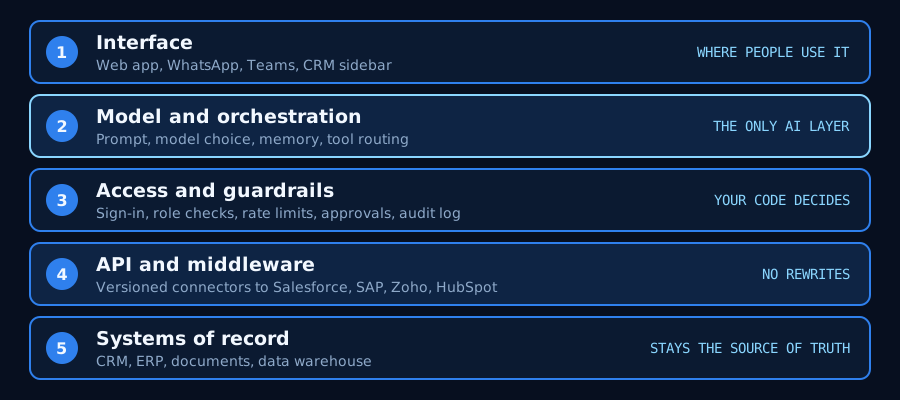
- Interface: where people use the AI, such as a web app, WhatsApp, Microsoft Teams or a sidebar inside the CRM.
- Model and orchestration: the prompt, the choice of model, memory and the logic that decides which tool to call.
- Access and guardrails: sign-in, role checks, rate limits, approval steps and an audit log of every call.
- API and middleware: versioned connectors to Salesforce, SAP, Zoho, HubSpot or an in-house system.
- Systems of record: the CRM, ERP, document store or data warehouse that stays the source of truth.
What integration is not
It is not a rip and replace. You keep your ERP and CRM. We only suggest replacing a system when its API layer cannot support the connection, which is rare. It is also not a demo chatbot with no write access to anything.
Retrieval is one piece. If your main need is search over documents, start with RAG and knowledge systems and our guide to RAG that survives production. Integration covers the wider job: reading live records and writing results back.
Where UAE teams usually start
Four first projects come up most often. IT support is a common entry point, as covered in our piece on AI copilots for IT support.
- A support assistant inside an existing Zendesk or Salesforce queue.
- Natural-language search across an intranet or internal knowledge base.
- Approvals and ticket creation driven by data an AI model extracts from documents.
- A bridge from a legacy on-premise system to a modern AI layer, without migrating it.
How Do You Connect ChatGPT or Claude-Class Models to a CRM or ERP Safely?
Let the model ask for actions, and let your own code decide whether to run them. That one rule makes the integration safe. The model never holds database credentials and never calls your ERP directly. Anthropic describes tool use as the model returning a structured call that your application executes. OpenAI documents the same pattern as function calling. If you want a branded assistant as the front end, a custom GPT can sit on top of the same guarded service.
Let the model ask, let your code act
Your service sits between the model and the CRM. It receives the request and checks who the user is. It validates the arguments. Then it runs the call with an account scoped to that one task. Pass the real user identity through. A sales rep's assistant should only see what that rep can see in the CRM. A shared super-user account is the most common shortcut, and the most dangerous.
Read first, write later
Start with read-only tools, such as looking up an account or searching orders. Add writes after that, such as creating a task or updating a deal stage. Keep a human approval step on every write for the first weeks. Anything high impact, such as payments, price changes or ERP postings, should stay human approved for good.
What a guarded tool call looks like
The snippet below defines one read-only CRM tool. The model only sees the name, the description and the input shape. When it asks to run the tool, the service checks the user's role against an allowlist. It writes an audit entry. Only then does it call the CRM.
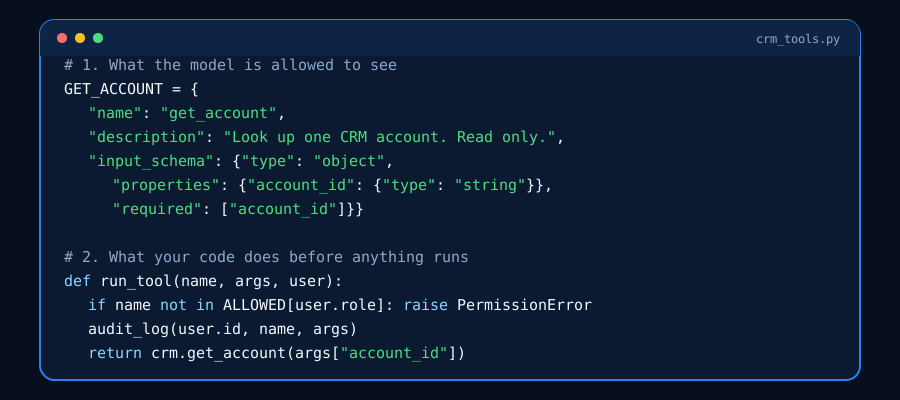
Each line maps to a real risk. The allowlist stops a model from reaching tools the user should not have. The audit entry gives compliance a trace of what was asked and by whom. The read-only call means a wrong answer cannot change a record.
Prompt injection and excessive agency
Text from emails, tickets and documents can carry hidden instructions. OWASP ranks prompt injection first in its 2025 Top 10 for LLM applications. It also names excessive agency: damaging actions triggered by unexpected or manipulated model output. OWASP traces the root cause to excessive functionality, excessive permissions or excessive autonomy. Your defence is design, not a cleverer prompt.
- Treat every piece of retrieved text as untrusted input.
- Give each tool the minimum permission it needs, and no more tools than the task requires.
- Rate limit calls per user and per tool.
- Require approval for any action that changes a record or moves money.
- Log every call with the user, the tool, the arguments and the result.
Do you need MCP?
The Model Context Protocol is an open standard for connecting AI applications to external systems. It can cut custom glue code when many tools share one interface. It does not replace permission checks. Whether you use MCP or plain APIs, the rules above still apply.
Cloud API, Private Cloud or On-Prem: Which Integration Route Suits UAE Data Rules?
Choose the route by what data the prompt carries, not by habit. A prompt that holds public product copy is a different case from one that holds customer names or account balances.
What the UAE personal data law means for your choice
Federal Decree-Law No. 45 of 2021, the Personal Data Protection Law, came into force on 2 January 2022. It governs how personal data is handled. Whether a given prompt may leave the country depends on the data, your sector regulator and your contracts. Banking, health and government work often add stricter conditions. Get legal advice early, and do not assume the answer. Our guide to sovereign AI and data residency in the UAE goes deeper on the legal side.
The three routes
Major clouds run regions in the UAE. Microsoft's geography page lists UAE North and UAE Central among its Azure regions. Model availability differs by region and changes often, so confirm which models you can call in-region before you design around one. For hardware, cost and model choice on a self-hosted route, read our guide to local LLM deployment in the GCC.
- Choose the hosted API if: the prompts hold no regulated personal data, or you can mask it before it leaves your network. It is the fastest start and usually the cheapest. Add a gateway that strips identifiers and logs every call.
- Choose an in-region private cloud if: residency rules out the public endpoint, but you do not want to run hardware. Check that the model you need is offered in that region, and who can access logs.
- Choose on-premise if: the rules rule out a private cloud, as in some government and banking work. Or your volume makes fixed hardware cheaper than per-token billing. Expect a bridge between the on-prem system and the model host, which is part of the integration scope.
Arabic content flowing through existing systems
Customers write to you in Arabic, English and a mix of both. That text lands in CRM notes, tickets and WhatsApp threads. Test the whole path, not only the model. Check that your CRM fields store Arabic correctly, that right-to-left text displays in reports, and that names survive transliteration between systems. A model that reads Arabic well still fails if the pipeline around it breaks the text. Our note on native Arabic NLP for GCC chatbots covers the language side.
How Long Does an AI Integration Take and What Delays It?
Our live service page states an average of 6 weeks to a first production integration. A working prototype, validated on your data, typically takes 2 to 4 weeks. A full production rollout usually lands inside one quarter, depending on scope and integration complexity. These are the figures on our AI integration services page, not a promise for every project.
A realistic path in four steps
- Systems audit: map your stack, APIs and data flows to find the safest integration points.
- Integration design: design the API and middleware layer and the access model before writing code.
- Build and test: build against a staging environment with your real workflows, not a demo.
- Deploy and monitor: ship with monitoring and rollback paths, then tune against live use.
What delays an integration
Delays almost never come from the model. They come from the systems around it.
- No staging environment, so every test touches production.
- Poorly documented or locked APIs, especially on older ERP versions.
- Slow access approvals and security reviews that start late.
- Messy source data, such as duplicate accounts or mixed-language fields.
- Scope creep from one system to five before the first one works.
- No named owner on the business side to approve test results.
How pricing works
Cost depends on how many systems you connect and how mature their APIs are. A single well-documented integration is a matter of weeks. A multi-system build is scoped separately. We quote a fixed price after the systems audit, not an open-ended hourly rate.
How Do You Test an AI Integration Before It Touches Production Data?
Run it in staging, then in shadow mode, and only then go live. At each step the integration earns more access. Never start by pointing a new assistant at the live CRM.
Stage with masked data
Build in a staging copy of the CRM or ERP. Mask names, phone numbers and IDs, or use synthetic records. This lets engineers break things freely. It also keeps personal data out of test logs.
Shadow mode on real traffic
Next, let the AI see real requests but not act. It writes the action it would take into a log. A person does the real work. Compare the two for a defined period. The gap between them is your error rate, measured on your own workflow.
Build a test set that includes Arabic and edge cases
Collect a few dozen real cases per workflow. Include Arabic and mixed-language requests, missing fields, duplicate accounts and requests the AI should refuse. Re-run the set after every prompt, model or connector change. Without it, you cannot tell an improvement from a regression.
Go live with a kill switch
- Release to one team or one queue first, behind a feature flag.
- Keep a one-click switch that turns off write access and leaves read access on.
- Watch tool error rate, response time, cost per task and how often staff override the AI.
- Review the audit log weekly for calls nobody expected.
Should You Build the Integration In-House or Use a Partner?
Build in-house if you already have engineers who know your ERP and have spare capacity. Use a partner when the clock matters or the AI skills are missing. Bounce Technologies has served 50+ enterprise clients across 6+ GCC countries, with 10+ years of expertise. The patterns above are ones we run often.
- Choose in-house if: you have engineers with deep knowledge of the target systems, a stable roadmap, and time to learn LLM security and evaluation.
- Choose a partner if: you need a first production integration within a quarter, or your team is stretched. Also choose one if you need Arabic-ready design and UAE data-rule experience from day one.
- Choose a hybrid if: your team owns the systems and approvals. A partner designs the AI layer and hands it over with documentation and tests.
Frequently asked questions
Do we need to replace our ERP or CRM to add AI?
No. Integration connects AI to what you already run, such as Salesforce, SAP, Zoho, HubSpot or a custom system, over APIs. A replacement is only worth discussing when a system's API layer cannot support the connection, which is rare.
Is it safe to let ChatGPT or Claude access our CRM?
Yes, if the model never touches the CRM directly. The model requests an action, and your own service checks the user's role, validates the input, logs the call and then runs it. Start with read-only tools and keep human approval on every write.
Can we keep our data inside the UAE?
Often yes. You can use an in-region private cloud or an on-premise model host, with a bridge to your existing systems. Whether you must do so depends on the data, your sector regulator and your contracts, so confirm with legal counsel before you design.
How long does an AI integration take, and how is it priced?
Our service page states an average of 6 weeks to a first production integration, with a data-validated prototype typically in 2 to 4 weeks. We quote a fixed price after a systems audit, based on the number of systems and how mature their APIs are.
Can the integration handle Arabic and mixed-language data?
Yes, when the whole path is tested on Arabic: the model, the CRM fields, right-to-left display and name transliteration. Native Arabic NLP is a core focus at Bounce Technologies, and we include Arabic cases in the test set before go-live.
Want this built for your team?
We ship production-grade AI like this across every industry, in weeks, not months.